PHP2Shell and PHP 8.2 End of Life: What to Do With Your Client WordPress Sites Before 2027
TL;DR: PHP2Shell is a pair of critical PHP flaws (CVE-2026-109618 and CVE-2026-109619) that are being exploited now. Every WordPress site needs to be on a fixed build today: PHP 8.5.12, 8.4.27, 8.3.36 or 8.2.35, or a patched package from your host. Separately, PHP 8.2 end of life is 31 December 2026, after which it gets no security fixes at all, and several managed hosts remove it earlier in December. Treat both as one job: confirm the patch this week, then move every site you look after to PHP 8.3 at minimum, and ideally 8.4, before the year ends.
Agencies look after more WordPress sites than they have usually counted in one place, and most business owners have one on hosting someone else chose years ago. This guide covers PHP2Shell for WordPress sites in plain language, what PHP 8.2 end of life changes, how to sort a portfolio of client sites, and a routine for upgrading each one without breaking it.
Two deadlines, one job
The first deadline has already passed. On 21 October 2026 the PHP project released emergency security updates and asked all users to update immediately. Any site still on an older build is exposed today.
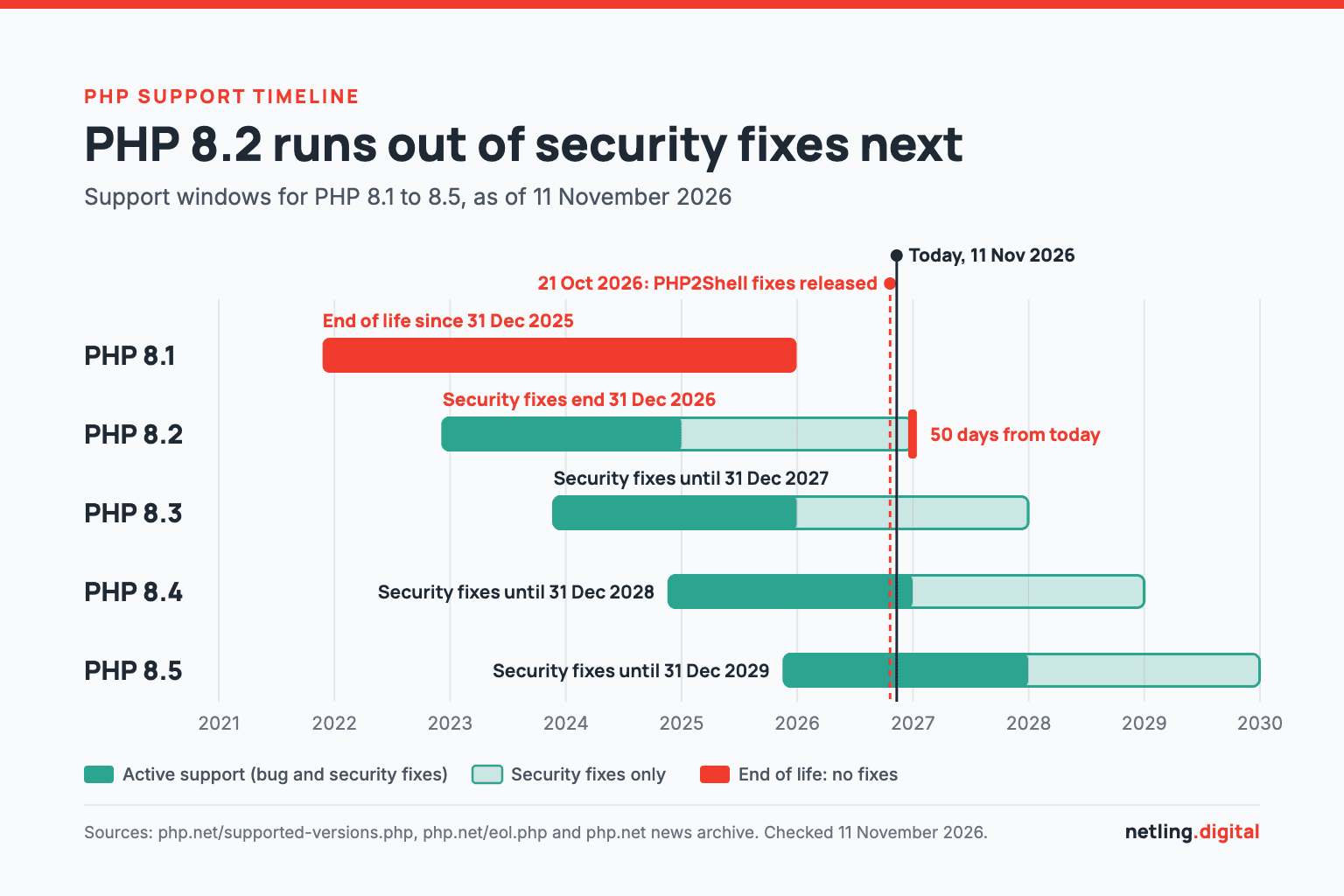
The second deadline is 31 December 2026. The official supported versions page lists that as the last day of security support for PHP 8.2. The PHP 8.2.35 release note says it plainly: 8.2 "will receive no further security fixes after that date".
Both are solved in the same place, the PHP version on the server, so run them as one project and test each client site once.
PHP2Shell in plain language
PHP is the programming language WordPress runs on. PHP2Shell is the nickname for two flaws in PHP itself, not in WordPress, a theme or a plugin. They can let an attacker run their own code on the web server without logging in. The PHP security team rated both 9.2 out of 10 on the CVSS v4.0 scale. Security firm Patchstack, which credits the name to Wiz Research, reports that at least one of the two issues affects every PHP version back to 5.4.
Because the flaw sits below WordPress, updating WordPress core or plugins does nothing about it. PHP's release notes are blunt: "There are no complete mitigations, updating is the only safe choice."
Which PHP versions are fixed
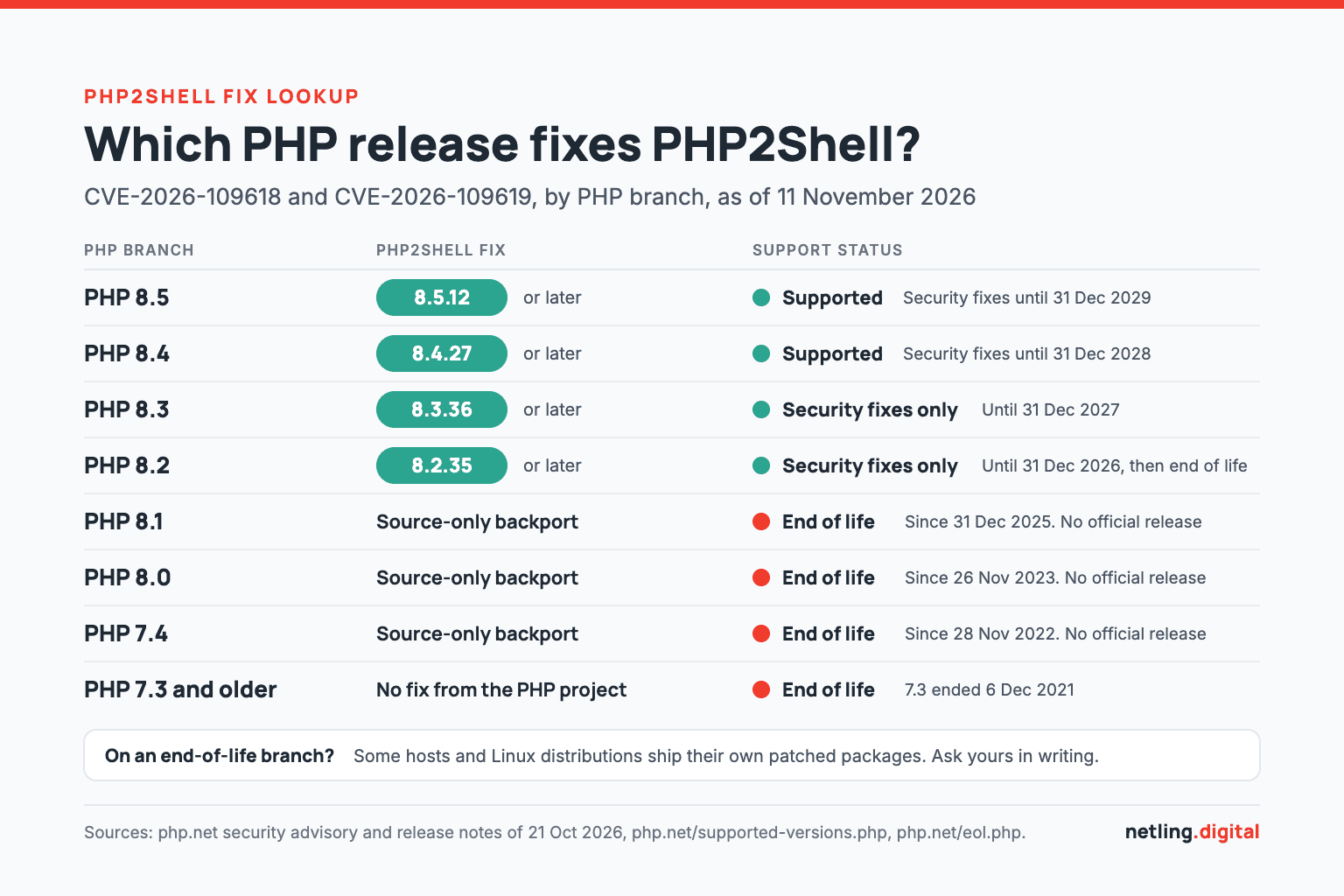
- PHP 8.5: fixed in 8.5.12
- PHP 8.4: fixed in 8.4.27
- PHP 8.3: fixed in 8.3.36
- PHP 8.2: fixed in 8.2.35
- PHP 8.1, 8.0 and 7.4: no official release, only minimal source-code backports for people who build PHP themselves. Some hosts and Linux distributions ship their own patched packages.
- PHP 7.3 and older: nothing from the PHP project.
We checked php.net on 11 November 2026, and these are still the current releases. A related issue, CVE-2026-115560, is waiting for the next regular PHP release. PHP calls the setup it needs unlikely in practice, but the "fixed" version numbers will move again soon. Patching is never done once.
What "exploited in the wild" means for an ordinary site
On 26 October 2026 the US cybersecurity agency CISA added both flaws to its Known Exploited Vulnerabilities catalog, its list of bugs that attackers are known to be using, and gave US federal agencies until 29 October to deal with them.
That does not mean somebody has singled out your site. Attacks like this are automated sweeps of the whole internet, and they find a five-page brochure site as easily as a busy store. Being small is no protection.
Who actually applies the patch
There is no "update PHP" button in the WordPress dashboard. Who patches depends on the hosting.
- Managed WordPress hosting: the host patches PHP for you. Kinsta, for example, said its customers "don’t need to install any patches or make changes to their websites" because the fix was applied across its platform. Look for a statement like this from your own host.
- Shared hosting with a control panel: the host updates PHP, but you usually choose which branch each site uses. On a very old branch, the host may have had nothing to install.
- A VPS, cloud server or anything self-managed: you, or whoever set the server up, must install the update. If that person has moved on, nobody is doing it.
Most agencies have all three across their client list.
How to check a WordPress site's PHP version
WordPress shows the PHP version itself. Log in as an administrator and go to Tools, then Site Health, then the Info tab, and open the Server section. The Site Health documentation describes each panel, and the Status tab warns you when the site "is running an outdated version of PHP, which requires an update".
Why the exact patch release matters
"PHP 8.2" is not an answer. PHP 8.2.34 is vulnerable and 8.2.35 is fixed, and they look identical in most hosting dashboards. You need the full three-part number.
There is a catch. Hosts that patch end-of-life branches themselves usually keep the old version number, so a site showing 8.1 or 7.4 may or may not be patched. You cannot tell from the dashboard.
What to ask the host
Send the same three questions for every hosting account and keep the replies:
- Which exact PHP build is this site running, and does it include the fixes for CVE-2026-109618 and CVE-2026-109619?
- On what date was the fix applied, and did it cover staging and inactive environments too?
- On what date will you remove PHP 8.2, and what happens to sites still on it?
PHP 8.2 end of life: why this is the same story
PHP 8.2 received a proper PHP2Shell fix for one reason: it was still inside its security support window. PHP 8.1 left that window on 31 December 2025, according to PHP's end-of-life list. Ten months later its users got a source patch and a suggestion to ask their vendor. PHP 8.2 users will be in that position from 1 January 2027.
OWASP's Top 10 entry on Vulnerable and Outdated Components says you are likely vulnerable "if the software is vulnerable, unsupported, or out of date". CISA's PHP2Shell alert went further and advised taking systems offline if they cannot be updated or run PHP 8.1 or earlier. We covered the same pattern for JavaScript frameworks in our post on the Nuxt 3 end of life.
How many WordPress sites are affected
We read the figures behind the WordPress.org statistics page on 11 November 2026:
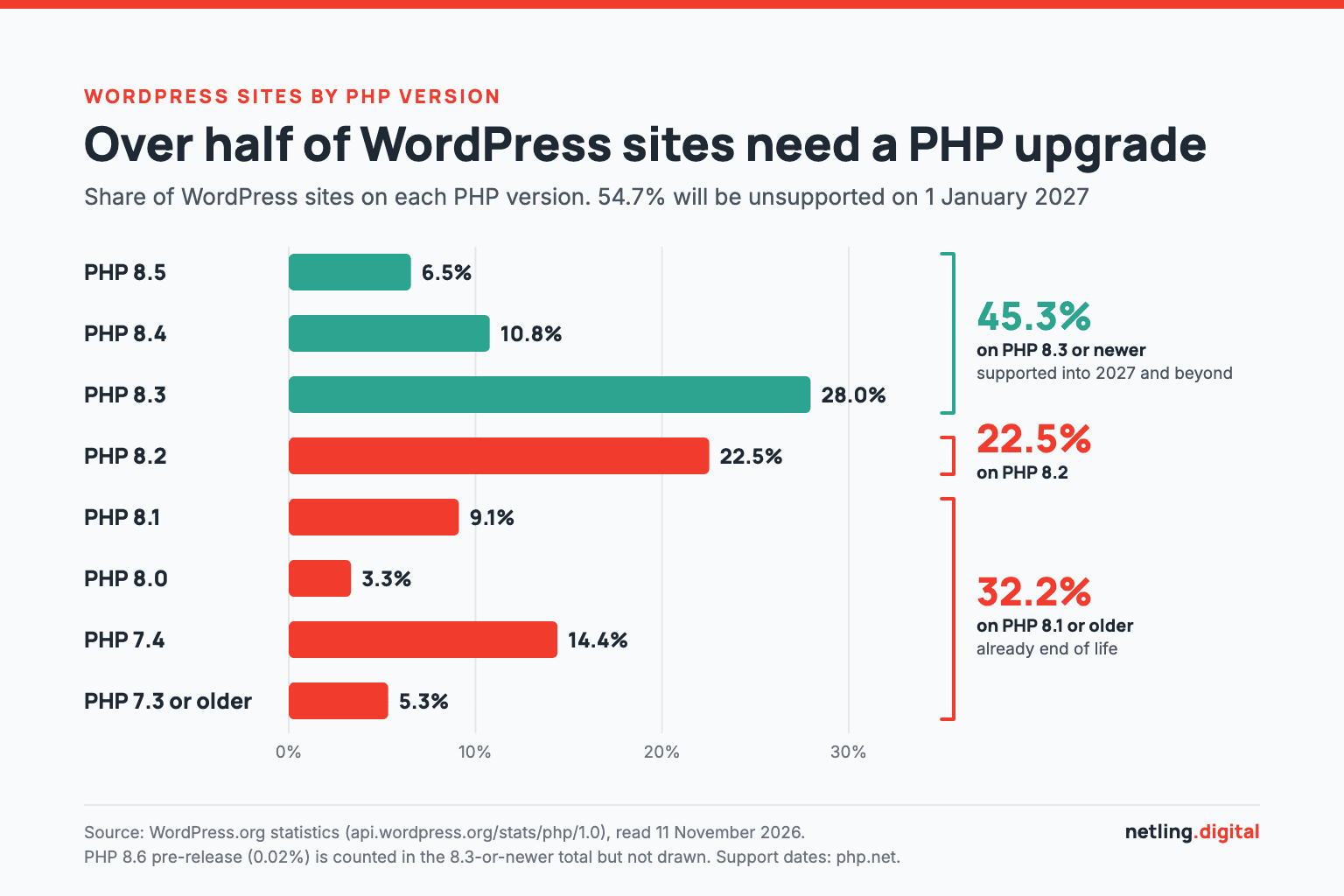
- 45.3% of WordPress sites run PHP 8.3 or newer, which keeps security support into 2027 and beyond.
- 22.5% run PHP 8.2, which loses it on 31 December 2026.
- 32.2% run PHP 8.1 or older, which is already unsupported. PHP 7.4 alone accounts for 14.4%.
Put together, 54.7% of WordPress sites will be on an unsupported PHP version on New Year's Day unless someone moves them.
Your host may switch before PHP does
Managed hosts do not wait for 31 December. Three published schedules:
- Pressable retires PHP 8.2 on 8 December 2026 and automatically moves remaining sites to the next PHP version.
- WP Cloud removes PHP 8.2 on 15 December 2026 at 12:00 UTC.
- WordPress VIP starts updating non-production environments to PHP 8.3 on 16 November 2026 and production on 7 December 2026.
An untested switch on the host's timetable, in the busiest retail month of the year, is the outcome to avoid. Find your host's date and work back from it.
Which PHP version to move to
- PHP 8.3 is the minimum. WordPress's own requirements page recommends "PHP version 8.3 or greater". Security support runs to 31 December 2027, so it buys one year.
- PHP 8.4 is the target. Security support runs to 31 December 2028: two quiet years instead of one. The WordPress core team's PHP compatibility table lists WordPress 7.0 and 7.1 as supporting it.
- PHP 8.5 is fine for well-kept sites. It is covered until 31 December 2029, but only 6.5% of WordPress sites run it so far, so less common plugins have had less real-world use on it. PHP 8.6 is not out yet (the first stable release is planned for 19 November 2026) and is too new for client sites.
What tends to break
A current WordPress release is rarely the problem. The risk is everything added to it:
- Abandoned plugins. Patchstack's State of WordPress Security in 2026 counted 11,334 new vulnerabilities in the WordPress ecosystem in 2025, 91% of them in plugins, and found that 46% had no fix from the developer in time for public disclosure. A plugin nobody maintains has not been tested on PHP 8.4 either.
- Old premium themes. Bought once, customised heavily and never updated, because updating would wipe the changes.
- Custom code. Snippets in the theme, a bespoke plugin from a previous developer, or an integration with a booking or payment system.
The size of the jump matters. From 8.2 to 8.3 or 8.4, problems are mostly warnings about outdated code. From 7.4 you cross a major version in which PHP became stricter and removed old features, and that is where white screens come from. If the site no longer has a developer, that is the moment to hire a WordPress developer to take it over.
Triage for a portfolio of client sites
Start with a spreadsheet: one row per site, with the host, who controls the server, the exact PHP version, the WordPress version and whether a staging copy exists. You will reuse this list every year.
One rule applies to every row: the site must be on a fixed PHP build this week, whatever branch it is on. Then put each site in one of three groups.
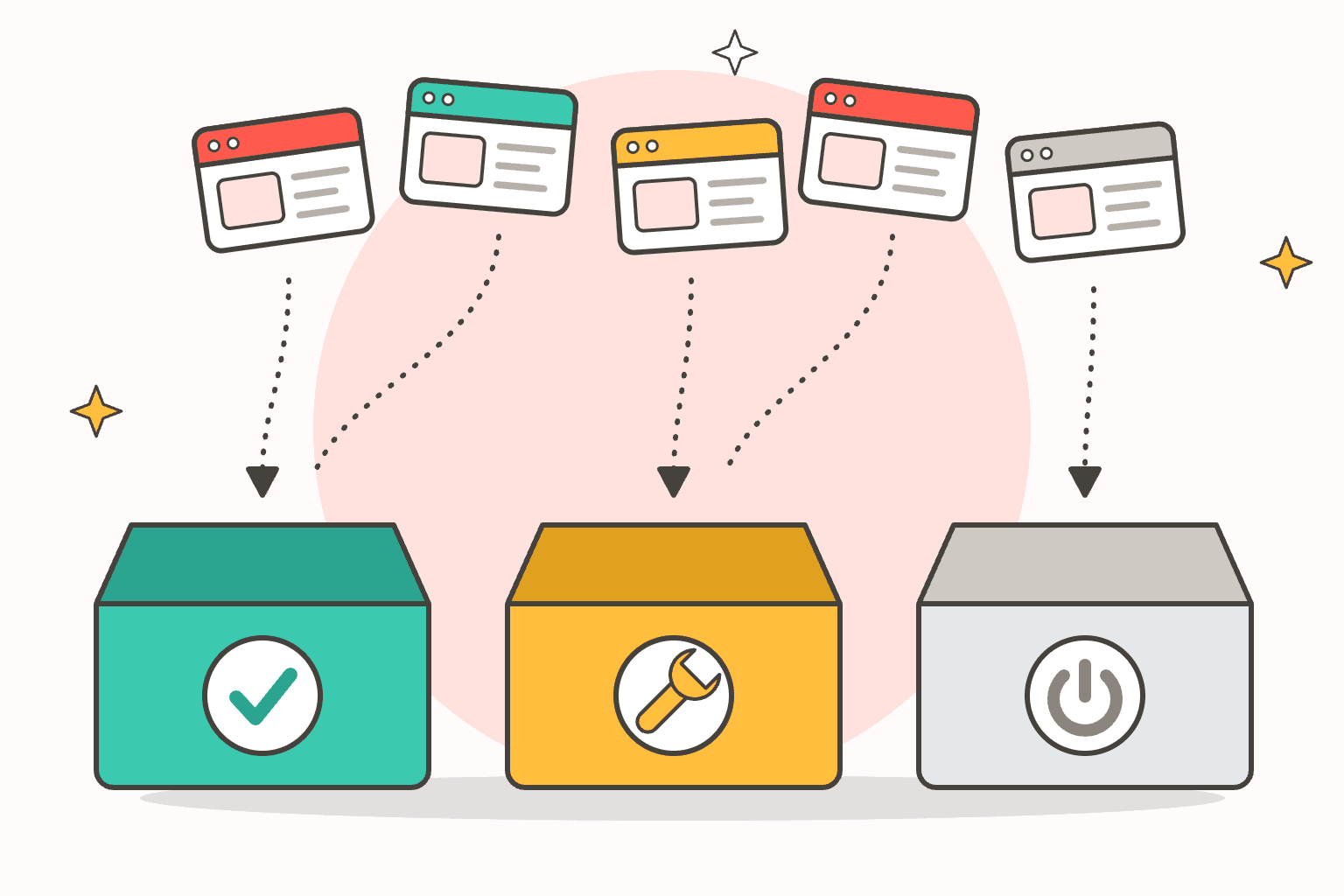
- Patch now. Healthy sites on current WordPress with maintained plugins and theme. Confirm the fixed build, test on staging and switch to PHP 8.4. Each site is a small job.
- Needs work. Sites that throw errors on staging, or that are still on 7.4, 8.0 or 8.1 because something broke the last time anyone tried. Get a patched package from the host as a stopgap, then schedule development time to replace the dead plugin, repair the theme or fix the custom code.
- Retire. Old campaign microsites, sites for clients who stopped paying, forgotten staging copies and demos. Nobody will fund fixing them, so archive each one as static pages or take it offline. An unpatched site nobody owns puts everything else on the same server at risk.
Within each group, start with stores, membership sites and anything holding personal data, then servers you manage yourself, then sites on a host with a December cut-off.
The per-site upgrade routine
For each site in the first two groups, the routine is the same:
- Back up. Take a full backup of files and database and confirm it restores.
- Copy to staging. Use the host's staging feature or a private copy. Never test on the live site.
- Update first. Bring WordPress core, plugins and the theme up to date on staging before touching PHP, so you change one thing at a time.
- Check compatibility. Check each plugin and the theme for a recent update and stated support for your target PHP version. Have a developer review custom code.
- Switch staging and read the error log. Turn on WordPress debug logging, then click through the pages that matter: forms, checkout, login, search and the editor. A page that looks fine can still be logging errors.
- Switch live at a quiet time. Keep the previous version available as a rollback for a few days.
- Monitor. Watch the error log, form submissions and orders for a week, then update your spreadsheet.
On a "needs work" site, step 4 becomes a small development project. Our post on non-functional testing explains why untested changes carry the risk.
Talking to clients, and where this fits in a care plan
Clients do not need the CVE numbers. They need three things: a serious flaw was found in the software underneath every WordPress site, theirs has been checked and patched, and its PHP version is being retired in December, so you recommend moving it now. Send that before they read about PHP2Shell elsewhere.
Be clear about what is included. On a care plan, the patch check and a routine PHP switch should sit inside it. Replacing an abandoned plugin or repairing an old theme is development work, and it is fair to quote for it separately. If the client has no plan, this is an honest moment to offer one.
PHP retires a branch every December: 8.1 in 2025, 8.2 this year, 8.3 in 2027. A care plan that lists an annual PHP review alongside core, theme and plugin updates turns a yearly scramble into a calendar entry. It is also predictable, recurring work that is easy to hand to a delivery partner, as we explain in our post on white-label partnerships for agencies.
If you do not have the hands
Thirty sites, each needing a backup, a staging test and a log review, is real work on top of a full pipeline. It is the maintenance and takeover work our WordPress team does: core, theme and plugin updates, bug fixes and small changes, including for sites another developer built and left behind. Agencies use our white-label WordPress development for it, with our developers working in your tools, under NDA, and never contacting your clients unless you ask. One-off clean-ups can run on hourly billing, and ongoing care can run on a monthly retainer with timesheets you can bill from. For work beyond WordPress, see our white-label web development service.
Frequently asked questions
What is PHP2Shell?
PHP2Shell is the nickname for two critical vulnerabilities in PHP, CVE-2026-109618 and CVE-2026-109619, fixed on 21 October 2026. They can let an attacker run code on a web server without logging in, and CISA lists both as actively exploited.
Does PHP2Shell affect WordPress sites?
Yes. WordPress runs on PHP, so any WordPress site on an unpatched PHP build is exposed, whatever plugins or theme it uses. Updating WordPress does not fix it. The host, or whoever manages the server, has to update PHP.
Which PHP version fixes PHP2Shell?
PHP 8.5.12, 8.4.27, 8.3.36 and 8.2.35. PHP 8.1, 8.0 and 7.4 received source-code backports only, so sites on those branches depend on a patched package from their host or Linux distribution. PHP 7.3 and older received nothing from the PHP project.
When is PHP 8.2 end of life?
PHP 8.2 security support ends on 31 December 2026, after which it receives no fixes from the PHP project. Some managed WordPress hosts remove it earlier: Pressable on 8 December 2026 and WP Cloud on 15 December 2026.
Which PHP version should a WordPress site use now?
PHP 8.3 at minimum, which WordPress itself recommends, and PHP 8.4 for most sites because it has security support until 31 December 2028. Test on a staging copy first, since old plugins, themes and custom code are what usually break.
Final thoughts
Confirm every site is on a patched build this week, sort your sites into patch now, needs work and retire, and move the first two groups to PHP 8.3 or 8.4 before your host's December cut-off does it for you.
If you would rather hand the list to someone, you can hire WordPress developers from us for a one-off clean-up or an ongoing retainer, under your own brand if you are an agency. Tell us how many sites you look after or send us a brief.
Image credit: the PHP logo in the featured image is by Colin Viebrock, used unmodified under CC BY-SA 4.0.
More Articles
Continue reading from our engineering blog.
Nuxt 3 Is End of Life: Migrate to Nuxt 4 Now or Wait for Nuxt 5?
Nuxt 3 reached end of life on 31 July 2026 and Nuxt 5 is not out yet. Here is what that means for a production app, when to migrate to Nuxt 4, when waiting is defensible, and what drives the effort.

How Much Does Custom Web Application Development Cost in 2026?
Custom web apps cost $10K–$500K+ in 2026. Here is what drives the price, how rates compare by region, what AI really changes, and the maintenance costs most quotes leave out.

Complete Guide to MVP Development for Startups 2026
Building an MVP in 2026 isn't just about cutting features; it's about leveraging AI-native workflows and high-level engineering craft to ship products that validate and scale.