

TL;DR: Nuxt 3 reached end of life on 31 July 2026, so it no longer receives security or bug fixes. Nuxt 5 is still unreleased as of mid-November 2026. For most production apps the answer is to migrate to Nuxt 4 now: it is the only supported version, it is a small step from Nuxt 3, and Nuxt's policy keeps it supported for at least six months after Nuxt 5 ships. Waiting only makes sense if a critical module blocks you, a change freeze is in force or the app is about to be retired, and then only with paid extended support and a dated plan.
If you pay for a Nuxt application rather than write it, the Nuxt 3 end of life can look like a developer's problem. It becomes yours the first time a security questionnaire asks which framework versions you run. This guide is for founders, product owners, agency owners and engineering managers. It covers what the Nuxt 3 EOL changes in practice, whether waiting for Nuxt 5 is a sensible bet, what makes a migration large or small, and how to keep your search rankings through the move.
What Nuxt 3 end of life means for an app in production
Your app does not stop working. Nuxt 3 stays on npm and your site keeps serving pages. What changes is what happens when something goes wrong.
No more security patches
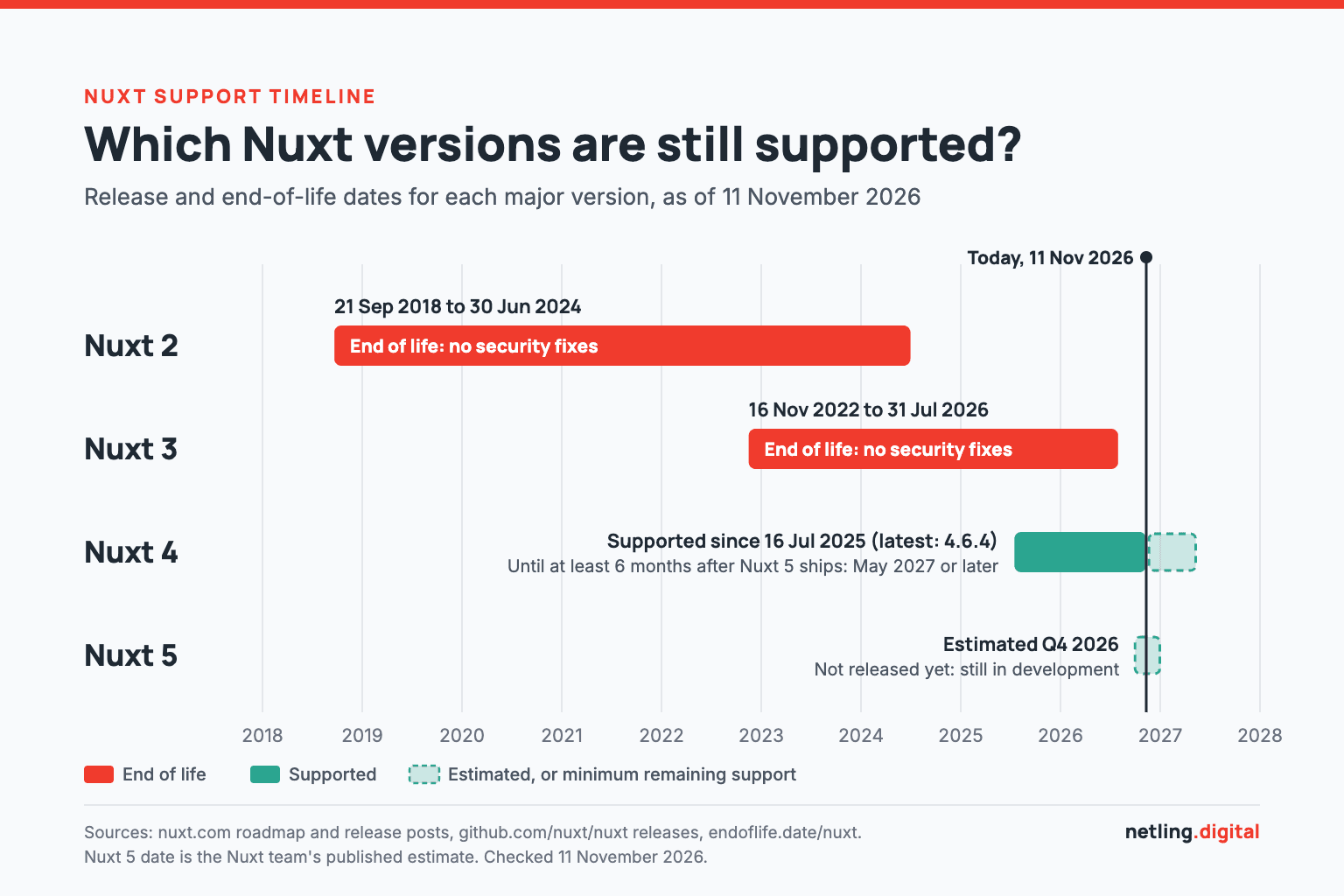
The Nuxt roadmap lists 3.x as unsupported, with an end-of-life date of 31 July 2026. The Nuxt 4 announcement originally promised maintenance only until the end of January 2026, which is why some articles still quote that date. It was later moved to 31 July, and that date has now passed. The independent tracker endoflife.date shows the same dates.
The effect is already visible. On 2 November 2026 the Nuxt team shipped version 4.6.4, described in the release notes as a security release fixing eight advisories in Nuxt and three more in Nitro, its server engine. There was no matching 3.x release. Whether or not those issues affect Nuxt 3, nobody upstream is checking or patching that line any more.
Compliance and customer questionnaires
Running unsupported software is a recognised risk category. OWASP's Top 10 entry on Vulnerable and Outdated Components says you are likely vulnerable "if the software is vulnerable, unsupported, or out of date". If you sell to enterprises or hold SOC 2, ISO 27001 or PCI obligations, an end-of-life framework is a finding you will have to explain, with either a migration date or a compensating control.
Module support dries up
Module authors build and test against the current major version. Over time, new releases of official and community modules tend to stop supporting the old one, so a Nuxt 3 app ends up pinned to older versions of its dependencies as well. It is the pattern we describe in our post on legacy system modernisation mistakes: the upgrade never gets cheaper by waiting.
What changed in Nuxt 4, in plain language
Nuxt 4 went stable on 16 July 2025 after a year of public testing. The team called it a stability-focused release, and that is fair: there is no new rendering model and no rewrite of how pages are built. The main changes are:
- A tidier project layout. Application code moves into an
app/folder. Nuxt still detects the old layout, so the move is recommended, not forced. - More consistent data fetching. The functions that load page data share results more predictably and have slightly different defaults. Most of the real code review goes here.
- Stricter TypeScript. App code and server code are type-checked separately, which often surfaces bugs that were already there.
- Updated metadata handling. The library that manages titles and meta tags moved to a new major version, which matters for SEO.
The Nuxt team wrote that they hoped "most Nuxt 3 projects can upgrade with a minimum of effort". The official upgrade guide rates each change by impact, and most are marked minimal. It also ships a codemod that applies the mechanical changes automatically:
npx codemod@0.18.7 nuxt/4/migration-recipe
The guide pins a specific codemod version, so check it for the current one. The codemod handles the repetitive edits. It does not test your app, check your modules or confirm your pages still render the same HTML. That is the part you pay people for.
Migrate to Nuxt 4 now or wait for Nuxt 5?
There is a serious argument for waiting. TuxCare, which sells extended support for Nuxt 3, sets it out clearly: "If you migrate 3 to 4 now, you're committing to another migration cycle once Nuxt 5 ships." Their alternative is to stay on Nuxt 3 with paid security cover, skip Nuxt 4 and jump straight to Nuxt 5 once it stabilises. To be fair to them, the same article says that "for most Nuxt 3 apps, upgrading to Nuxt 4 is the right move."
We agree with that last sentence. We have a commercial interest too, since we do migrations, so here is the reasoning for you to judge.
Where Nuxt 5 actually stands
The roadmap lists Nuxt 5 as "Q4 2026 (estimated)". As of 11 November 2026 there is no stable, beta or release-candidate version of Nuxt 5 on the releases page, and the Nuxt 5 upgrade guide says it "is still in development". Its biggest change is Nitro v3, which the guide calls "a major rewrite of the server engine". Nitro v3 itself only reached release-candidate stage at the end of October 2026, according to its release history.
An estimate is not a date. Even once Nuxt 5 ships, community modules need time to catch up with a rewritten server engine before a production app can safely move.
Why Nuxt 4 is not a wasted step
Three facts weaken the "two migrations" objection:
- The support window is defined. Nuxt commits "to support each major version of Nuxt for a minimum of six months after the release of the next major version". Since Nuxt 5 has not shipped, Nuxt 4 is covered until at least May 2027, and later for every week Nuxt 5 slips.
- Nuxt 4 is the on-ramp to Nuxt 5. The Nuxt 4.6 release post says "most of what's new in Nuxt 5 is already in 4.6, either on by default or behind a flag". One setting,
future.compatibilityVersion: 5, switches on the Nuxt 5 defaults inside Nuxt 4 so a team can fix what breaks at its own pace. - Skipping a major doubles the jump. Going from 3 to 5 means absorbing the Nuxt 4 changes and the Nitro rewrite in one release, on an app that has had no security fixes in the meantime. Two small, tested steps carry less risk than one large one.
A decision by app type
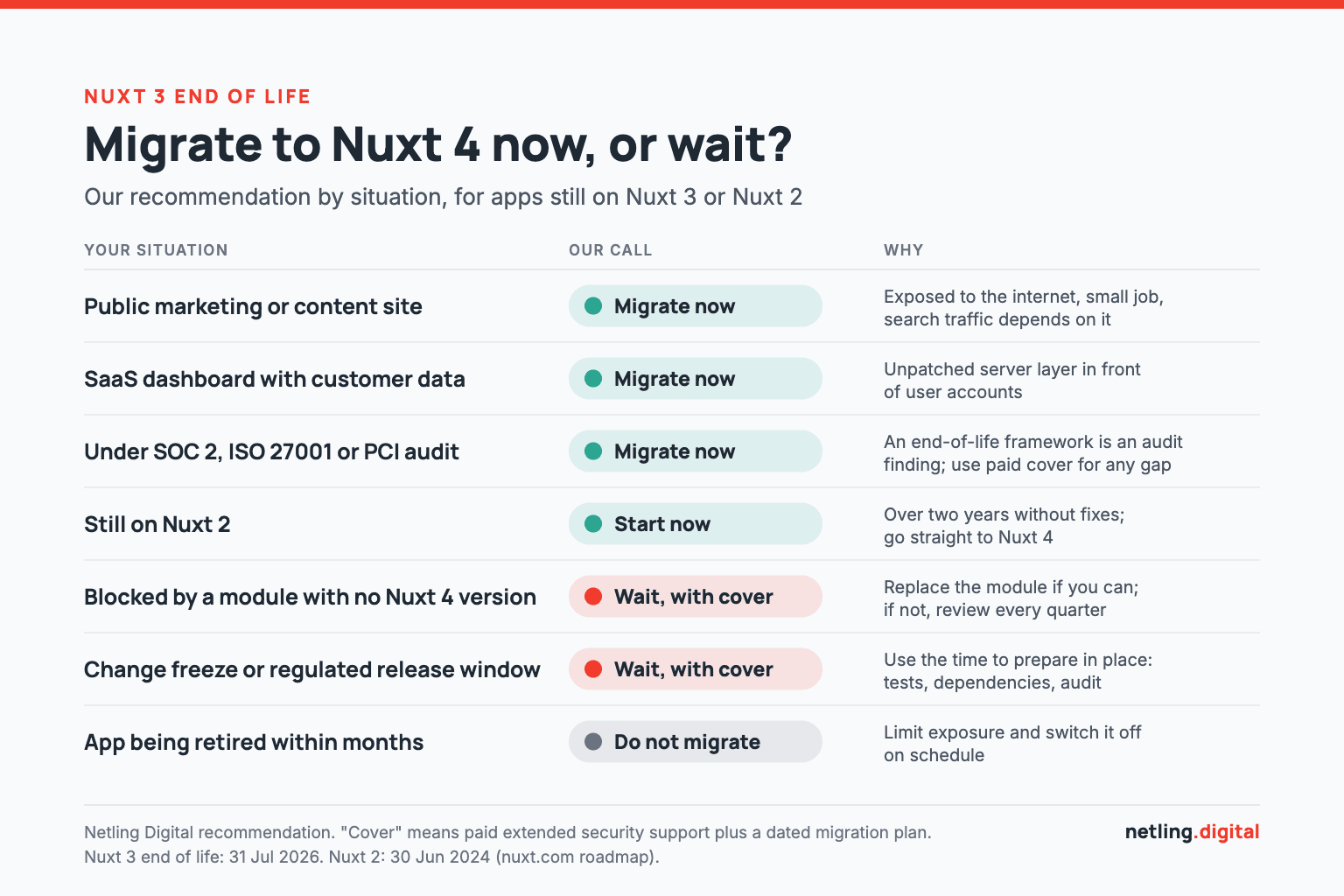
- Public marketing or content site: migrate now. It is public, the job is small and search traffic depends on it.
- SaaS dashboard holding customer data: migrate now. An unpatched server layer in front of user accounts is a poor place to economise.
- App under SOC 2, ISO 27001 or PCI audit: migrate now, or buy extended support to cover the gap until you can.
- Still on Nuxt 2: start now and go straight to Nuxt 4.
- Blocked by a module with no Nuxt 4 version: replace the module if you can. If you truly cannot, wait with extended support and review the position each quarter.
- In a change freeze or regulated release window: wait with extended support, and use the time to prepare in place.
- Being retired within months: do not migrate. Limit its exposure and switch it off on schedule.
If you do wait, wait with cover
Commercial extended support exists for this case. HeroDevs offers Never-Ending Support covering Nuxt 2.x and 3.x, and TuxCare sells a similar service. Both provide patched builds of the framework. They are a reasonable bridge and a poor destination: you pay a subscription to stand still while your modules keep ageing. Put an end date on it.
What drives Nuxt migration cost and effort
We are not going to print a price here. Nuxt migration cost depends on the codebase, and any number given without seeing yours would be a guess. What we can tell you is what moves the estimate.
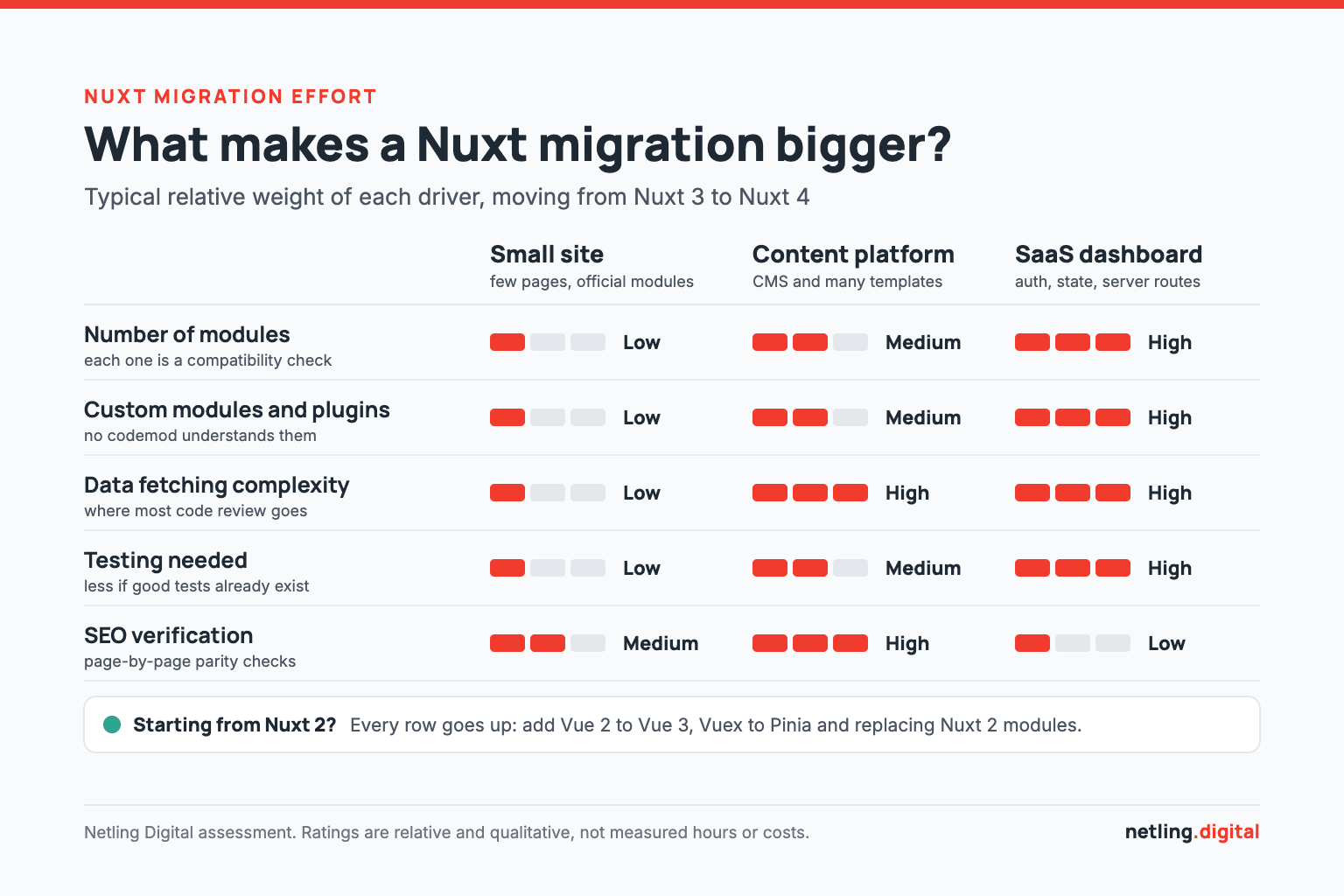
- Module count. Every module is a compatibility check. Ten well-maintained official modules are easy. Three abandoned community ones are not.
- Custom modules and plugins. Code that hooks into Nuxt's internals is the code most likely to break, and no codemod understands it.
- Data fetching complexity. The more pages load data in unusual ways, the more of the Nuxt 4 changes need human review.
- Test coverage. With good automated tests, most of the checking is automatic. Without them, every page is checked by hand or tests are written first. See our post on non-functional testing.
- Starting point. Nuxt 3 to 4 is an upgrade. Nuxt 2 to 4 is a migration to a different version of Vue, and a different size of budget.
How that plays out for three typical apps
A small marketing site has few pages, a handful of official modules and little custom code. The work is mostly mechanical, and more of the effort goes into verifying SEO parity than changing code.
A content platform (a blog, documentation site or headless storefront) has many templates, a CMS integration and heavy prerendering. Effort concentrates in data fetching and page-by-page verification, because organic traffic is the business. If your content lives in a headless CMS, give the integration its own line in the plan (our Strapi developers cover that side).
A SaaS dashboard has authentication, complex state, custom plugins and server routes. SEO matters less behind a login, but custom code and stricter TypeScript checks take longer, and test coverage decides how calm the release is.
A proper estimate starts with an audit: every module, plugin, store and build customisation, marked as compatible, replaceable or removable. That is the first step of the staged playbook we use when clients hire Nuxt developers from us: audit what you have, prepare in place, migrate in slices, verify page by page, then cut over and clean up. For wider budgeting context, see our guide to custom web application development cost.
Keeping your search rankings through the move
A framework upgrade should be invisible to Google: same URLs, same content, same or better speed. Rankings are lost when something small changes unnoticed across hundreds of pages, so we compare old and new, page by page, on five points.

- Rendered HTML parity. The HTML the server sends must contain the same headings, copy and links as before. Google's JavaScript SEO guidance notes that server-side or pre-rendering "is still a great idea because it makes your website faster for users and crawlers".
- Redirects. Ideally no URL changes at all. If any do, Google's site move documentation recommends mapping every old URL to its new one with permanent server-side redirects, and keeping them "for as long as possible, generally at least 1 year".
- Metadata. Titles, descriptions, canonical tags and hreflang come from the library that changed in Nuxt 4. Compare them across every route.
- Structured data. JSON-LD for articles, products, FAQs and breadcrumbs is easy to drop silently. Validate it before and after.
- Core Web Vitals. Per web.dev, a good page has a Largest Contentful Paint within 2.5 seconds, Interaction to Next Paint of 200 milliseconds or less and Cumulative Layout Shift of 0.1 or less, measured at the 75th percentile of page loads. Record your numbers before the migration so you can prove they held.
After launch, watch Search Console and your server error rates for a few weeks. This verification stage is where a specialist Nuxt development agency earns its fee. The upgrade commands are public. The discipline of checking every template is not.
Still on Nuxt 2? The longer path
Nuxt 2 reached end of life on 30 June 2024, so these apps have now been without upstream security fixes for more than two years. The path is longer because Nuxt 2 runs on Vue 2, and Nuxt 3 and 4 run on Vue 3. Three pieces of work dominate:
- Vuex to Pinia. State management moves to Pinia, the store Vue now recommends.
- Options API to Composition API. Not every component has to be rewritten, but mixins and anything built on Nuxt 2-only features do.
- Modules and build setup. Nuxt 2 modules have to be replaced with versions built for Nuxt 3 and later, some have no direct successor, and the default build tool changes from webpack to Vite.
Nuxt Bridge, which the Nuxt docs describe as "a compatibility layer that allows you to use Nuxt 3+ features in Nuxt 2 with an opt-in mechanism", can shorten the path for large apps. For small ones it is often quicker to skip it.
Do not migrate to Nuxt 3 on the way. It is end of life too. Go straight to Nuxt 4, in slices, with old and new running side by side behind a proxy so releases continue. If your app is plain Vue 2 with Vuex rather than Nuxt, the same staged approach applies, and our Vue.js developers handle those upgrades. Agencies with client sites on old versions can run this under their own brand through our white-label web development service.
Frequently asked questions
Is Nuxt 3 still supported?
No. Nuxt 3 reached end of life on 31 July 2026 and no longer receives security or bug fixes from the Nuxt team. Nuxt 4 is the only supported major version.
When will Nuxt 5 be released?
The official roadmap lists Nuxt 5 as "Q4 2026 (estimated)". As of 11 November 2026 it has not been released, and its upgrade guide describes it as still in development.
Should I skip Nuxt 4 and go straight to Nuxt 5?
For most apps, no. Nuxt 4 is supported for at least six months after Nuxt 5 ships, and it lets you switch on Nuxt 5 behaviour early with a compatibility flag. Skipping it means running unpatched software until Nuxt 5 and its modules are stable.
How hard is it to upgrade Nuxt 3 to Nuxt 4?
For most apps it is a modest upgrade. The official codemod handles the mechanical changes. Module count, custom code and test coverage decide the rest.
Can I migrate from Nuxt 2 directly to Nuxt 4?
Yes, and you should, since Nuxt 3 is also end of life. It is a larger project because it includes the move from Vue 2 to Vue 3, Vuex to Pinia and a new build setup, so it is best done in stages.
Final thoughts
The Nuxt 3 end of life is not an emergency, but it should not be ignored. For most teams the sensible move is to upgrade to Nuxt 4 now while the step is small, switch on the Nuxt 5 compatibility flag when you are ready, and take Nuxt 5 as a routine upgrade once it and your modules have settled. If you have to wait, do it with extended support and a date in the calendar.
This website runs on Nuxt 4, and migrations are the most common reason teams hire Nuxt developers from us. If you want a written audit and a staged plan before you commit a budget, tell us about your app or send us a project brief. To hand over upgrades for good, our Support service covers dependency updates, monitoring and fixes for live apps.
More Articles
Continue reading from our engineering blog.
PHP2Shell and PHP 8.2 End of Life: What to Do With Your Client WordPress Sites Before 2027
PHP2Shell needs patching now and PHP 8.2 loses security support on 31 December 2026. Here is how to check a WordPress site, sort a portfolio of client sites and upgrade each one to PHP 8.3 or 8.4 safely.

How Much Does Custom Web Application Development Cost in 2026?
Custom web apps cost $10K–$500K+ in 2026. Here is what drives the price, how rates compare by region, what AI really changes, and the maintenance costs most quotes leave out.

Complete Guide to MVP Development for Startups 2026
Building an MVP in 2026 isn't just about cutting features; it's about leveraging AI-native workflows and high-level engineering craft to ship products that validate and scale.