

TL;DR: The WordPress 7.2 Secrets API was pulled on 17 November 2026, so 7.2 will not encrypt your clients' plugin API keys: when it ships on 8 December, each key stays where its plugin put it. For 7 of the 10 popular key holders we checked, a database copy alone reveals the key. Nobody needs to add WP_SECRETS_KEY. Instead, run a read-only check, move keys into wp-config.php where the plugin reads a constant (5 of 10), and rotate keys that sat in old copies.
This is for developers and agencies who maintain WordPress sites for clients. Some of those clients are now forwarding articles, written before the revert, that tell them to add a new key to wp-config.php before 8 December. That advice is out of date, but the problem it was meant to fix is still there: most of the plugins we checked keep API keys where any database copy can read them.
We read the code of nine widely installed plugins and WordPress's own Connectors screen to see where each keeps its API keys. Then we tested a read-only check that finds those rows without printing a value. Everything here was checked on 19 November 2026 against WordPress 7.2 RC2.
If you own the site, forward this to whoever maintains it. Ask them for the four things under "Who should do the work".
What is the WordPress 7.2 Secrets API, and why was it pulled?
The Secrets API was a core API that would have stored credentials encrypted with libsodium. The encryption depended on a site key, WP_SECRETS_KEY, kept in wp-config.php. Plugins would have called it to save and read their keys instead of writing them to the options table.
On 17 November 2026 it was reverted from 7.2. The dev note now opens with "The Secrets API will no longer be shipping with WordPress 7.2." The commit gives three reasons. The API needs more time to mature. Feedback questioned "whether writing secrets belongs in the same API as reading host-provided secrets". And a review found that the manage_secrets and manage_network_secrets capabilities were not checked when secrets were set.
There is no new date. In a comment on the dev note, the API's author said he would "still like to target at least 7.3 if possible". That is his stated goal; no release plan commits to it yet.
What WordPress 7.2 changes for your clients' API keys on 8 December: nothing
WordPress 7.2 is still scheduled for 8 December, and it touches no stored key. We searched the 7.2 RC2 package for WP_SECRETS_KEY, wp_set_secret, wp_get_secret and manage_secrets and found no matches. There is nothing for the constant to switch on.
Even the original design would not have encrypted an existing key on release day, because each plugin had to adopt the API first. None of the 17 plugins we searched calls it: the nine in our matrix, plus eight that a wordpress.org directory search for "secrets api" returned. That is a sample, not the whole directory.
Sites that ran a 7.2 beta need one extra look. The Hosting Team notes that the revert "removes the code but not the data". The _wp_secret_* option rows, the manage_secrets capability on the administrator role and the WP_SECRETS_KEY constant stay behind. A Dashboard update also leaves the Secrets files on disk, while a WP-CLI update removes them.
After updating such a site, test payment, email and CRM connections, in case custom code stored a key through the API. Once they work, remove the leftovers with WP-CLI. The first command lists the rows by name only:
wp option list --search='_wp_secret_*' --fields=option_name
wp option list --search='_wp_secret_*' --field=option_name | while read -r name; do wp option delete "$name"; done
wp cap remove administrator manage_secrets
wp config delete WP_SECRETS_KEY
We ran these on a test site where we recreated the leftovers by hand, not on a site that ran the beta, so back up the database before you delete anything.
Where WordPress plugins store API keys: 10 popular key holders checked
Keys typed into a plugin's settings screen go into the wp_options table. In the dev note's comments, the API's author put it plainly. Those credentials "sit in wp_options in plaintext, where they show up in every dump, backup, staging clone, and export".
To see how far that holds, we picked nine widely installed wordpress.org plugins that hold a payment, email, CRM, analytics or anti-spam credential. We added the core Connectors screen, which holds AI provider keys. We read the code that saves and reads each key in the current release. Then we confirmed every row on a local test site with fake keys.
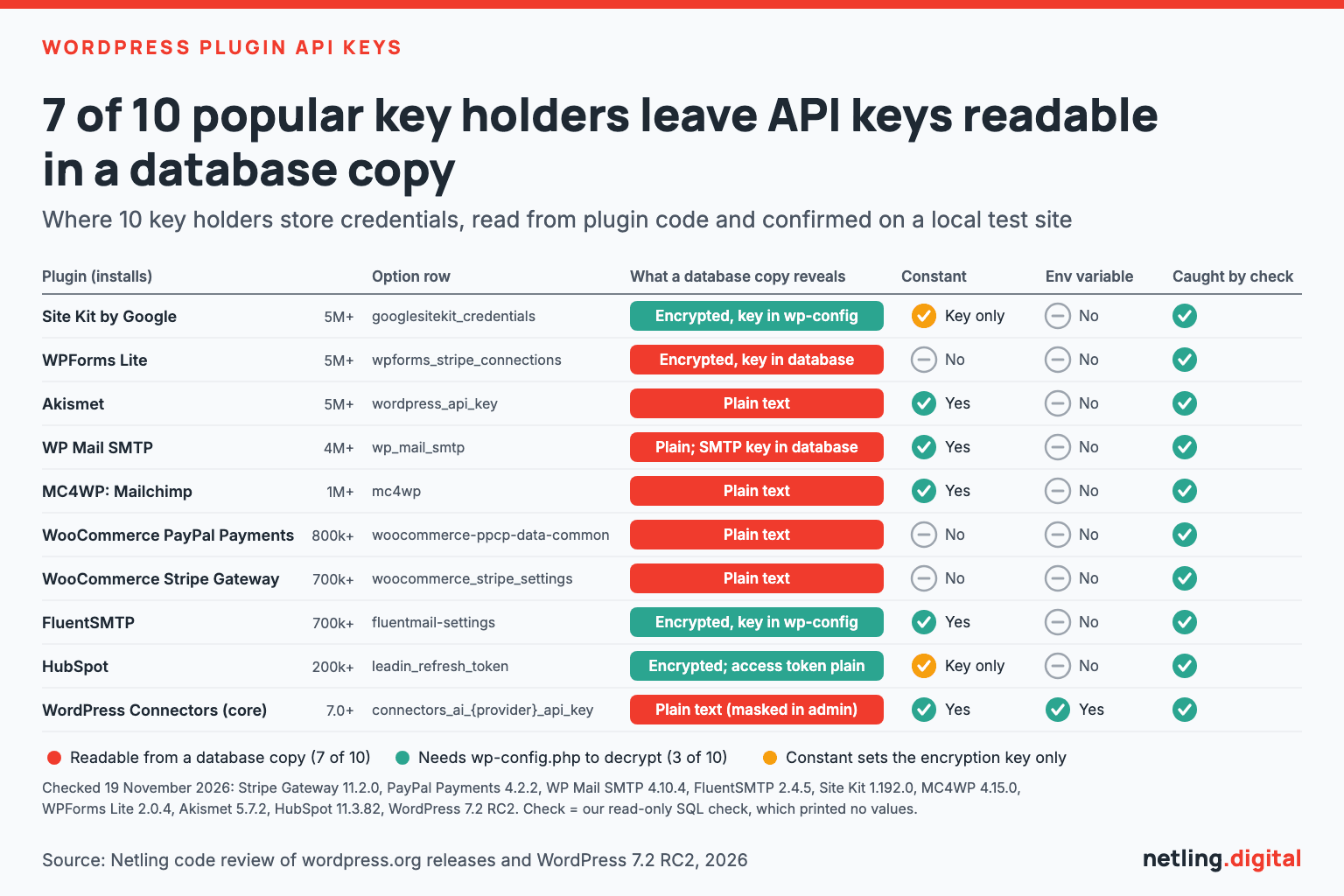
Versions read on 19 November 2026: Stripe Gateway 11.2.0, PayPal Payments 4.2.2, WP Mail SMTP 4.10.4, FluentSMTP 2.4.5 and Site Kit 1.192.0. Also MC4WP 4.15.0, WPForms Lite 2.0.4, Akismet 5.7.2, HubSpot 11.3.82 and WordPress 7.2 RC2.
Three ways plugins store a key, and what a database copy reveals
Plain text in a settings row (6 of 10). This covers WooCommerce Stripe Gateway, WooCommerce PayPal Payments, WP Mail SMTP's mailer API keys, MC4WP: Mailchimp for WordPress, Akismet and core Connectors. Anyone with a copy of the database can read these keys. Stripe Gateway also keeps a Stripe app refresh token in the same row. Connectors masks the key on screen but stores it unencrypted.
Encrypted, with the decryption key in the same table (1 of 10). WPForms Lite encrypts its Stripe Connect token but keeps the key in another row, wpforms_crypto_secret_key. Its Stripe webhook secret is plain text. WP Mail SMTP, counted above for its mailer API keys, treats the SMTP password the same way, with the key in wp_mail_smtp_mail_key. This hides the value from screens and logs, but a database copy carries both rows. In our test, both values decrypted from the database alone.
Together, these first two groups make up the 7 of 10 key holders whose keys a database copy reveals.
Encrypted with a key from wp-config.php (3 of 10). FluentSMTP, Site Kit by Google and HubSpot derive their encryption key from the WordPress salts, or from their own constant. A database-only copy holds ciphertext that is useless without the file. One gap remains: HubSpot also caches a short-lived access token in plain text, in the _transient_leadin_access_token row.
The catch with salt-based encryption
Encryption tied to the salts has a cost. If the salts change, the stored value stops decrypting. A security plugin that rotates salts, a host or a migration can all change them. FluentSMTP's documentation says it encrypts the secret "with your WordPress SALT keys".
One agency reported that after WP Engine rewrote wp-config.php on sites it manages on 5–6 November 2026, FluentSMTP's saved passwords stopped decrypting on nine sites. Email stopped sending, and nothing flagged it. That is the agency's account; we have not seen this break a site ourselves. After any salt change, send a test email and reconnect Site Kit if its data stops loading.
Which copies of a site carry an API key
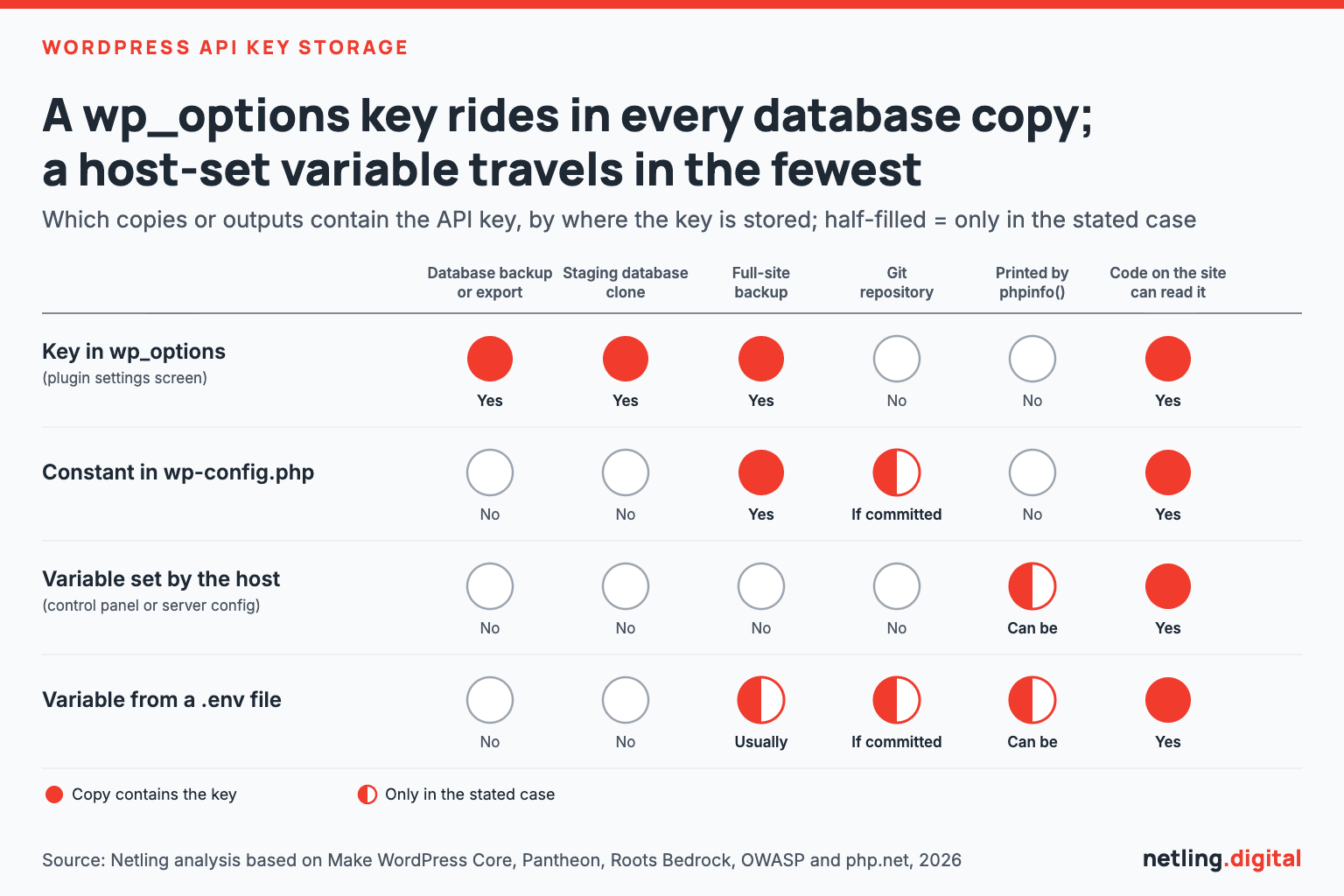
Moving a key changes which copies of the site carry it. A client site usually has several: nightly database dumps, staging clones, contractor exports, full-site backups and sometimes a Git repository.
A key in wp_options rides in every database copy. A constant in wp-config.php stays out of database dumps and database-only staging clones. It is still in every full-site backup, and in Git if the file is committed. A .env file is just another file, so it usually behaves the same way.
A variable set in the host's control panel or server config travels with the fewest copies. But phpinfo() and debug output can print it, and OWASP warns that environment variables "may be included in logs or system dumps".
No storage location protects a key from code running on the site. The dev note said it of the Secrets API itself: "any code running on the site can read any secret". A vulnerable plugin reads a constant as easily as an option row. Moving keys only reduces what the copies expose, which is why a site that is behind on updates should fix that first.
Check your own sites for plain-text API keys (read-only)
A search for key-like option names misses most of the rows in our matrix. Only 4 of the 10 key rows in the matrix have key-like names: wordpress_api_key, connectors_ai_*_api_key, leadin_refresh_token and googlesitekit_credentials. The other 6 sit under names like mc4wp or woocommerce-ppcp-data-common.
So our check runs two SELECT queries on each options table and prints the option name, size and the rules each row hit, never a value. Pass 1 lists the known rows from the matrix, plus the rows that decrypt WPForms and WP Mail SMTP values. Pass 2 flags key-like names, known key formats (Stripe, Mailchimp, SendGrid and others), and non-empty api_key, secret, token or password fields inside serialised arrays and JSON.
Run the check on one site or a whole portfolio
Save this as check.sh and run it from the WordPress root with WP-CLI:
#!/usr/bin/env bash
# Read-only check for API keys in WordPress options: runs SELECT queries only and prints
# option name, autoload, value size and a rule label, never a value.
# Tested on WordPress 7.2-RC2, WP-CLI 2.12.0, MariaDB 11.4 and MySQL 8.4, 2026-11-19.
# Run from the WordPress root: bash check.sh   (or: bash check.sh --path=/var/www/site)
set -euo pipefail
P=$(wp "$@" db prefix)   # custom prefix and multisite (wp_2_options ...) handled below
TABLES=$(wp "$@" db tables --all-tables-with-prefix | grep -E "^${P}([0-9]+_)?options$")

read -r -d '' PASS1 <<'SQL' || true
SELECT option_name, autoload, LENGTH(option_value) AS bytes FROM wp_options
WHERE option_name IN ('woocommerce_stripe_settings', 'woocommerce-ppcp-data-common',
  'woocommerce-ppcp-settings', 'wp_mail_smtp', 'wp_mail_smtp_mail_key', 'fluentmail-settings',
  'googlesitekit_credentials', 'mc4wp', 'wpforms_settings', 'wpforms_stripe_connections',
  'wpforms_crypto_secret_key', 'wordpress_api_key', 'leadin_refresh_token',
  '_transient_leadin_access_token')
  OR option_name LIKE 'connectors\_ai\_%\_api\_key'
ORDER BY option_name;
SQL

read -r -d '' PASS2 <<'SQL' || true
SELECT option_name, autoload, LENGTH(option_value) AS bytes, CONCAT_WS(' ',
  IF(option_name REGEXP 'api_?key|secret|token|passw|credential|_key$'
     AND option_name NOT LIKE '%\_timeout\_%' AND LENGTH(option_value) >= 8, 'name', NULL),
  IF(option_value REGEXP '(sk|rk)_live_[0-9a-z]{20}', 'stripe-live', NULL),
  IF(option_value REGEXP '(sk|rk)_test_[0-9a-z]{20}', 'stripe-test', NULL),
  IF(option_value REGEXP 'whsec_[0-9a-z]{20}', 'webhook-secret', NULL),
  IF(option_value REGEXP '[0-9a-f]{32}-us[0-9]{1,2}', 'mailchimp', NULL),
  IF(option_value REGEXP 'SG[.][0-9a-z_-]{16,}[.]|xkeysib-[0-9a-f]{32}|sk-(ant|proj)-|AIza[0-9a-z_-]{30}|ya29[.]|eyJ[0-9a-z_-]{8,}[.]eyJ', 'vendor-key', NULL),
  IF(option_value REGEXP '"[a-z_-]*(api_?key|secret|token|pass)[a-z_-]*";s:[1-9]', 'secret-field', NULL),
  IF(option_value REGEXP '"[a-z_]*(token|secret|api_?key|password)"[ ]*:[ ]*"[^"]{8}', 'json-secret', NULL),
  IF(option_value REGEXP '^[0-9a-z+/_-]{40,}={0,2}$', 'opaque-blob', NULL)
) AS hits
FROM wp_options HAVING hits <> '' ORDER BY option_name;
SQL

for T in $TABLES; do
  echo "== $T: pass 1, known key rows";   wp "$@" db query <<<"${PASS1//wp_options/$T}"
  echo "== $T: pass 2, name and value patterns"; wp "$@" db query <<<"${PASS2//wp_options/$T}"
done
For a portfolio, pass each site's path in a loop:
for site in /var/www/client-a /var/www/client-b; do
  bash check.sh --path="$site"
done
We ran it on 19 November on two throwaway WordPress 7.2 RC2 sites with fake keys: one with WooCommerce and the nine plugins, one plain. Both passes found all 10 key holders on the WooCommerce site and no rows on the plain one, and the output never contained a secret value. The queries also ran unchanged as a SELECT-only database user, on MariaDB 11.4 and MySQL 8.4.
We tested --path, a custom table prefix and a multisite subsite table, where the check found exactly the two fake keys we planted. We did not test WP-CLI aliases such as @prod. The server needs bash and the mysql or mariadb client, which wp db query calls.
Reading the output: real keys, false alarms and what it misses
Here are six rows of pass 2 output from our WooCommerce test site:
option_name	autoload	bytes	hits
mc4wp	auto	241	mailchimp secret-field
woocommerce_myaccount_lost_password_endpoint	on	13	name
woocommerce_stripe_settings	auto	2067	stripe-live stripe-test webhook-secret secret-field
woocommerce-ppcp-data-common	auto	558	secret-field
wordpress_api_key	auto	12	name
wpforms_crypto_secret_key	auto	44	name opaque-blob
Read each hit against the matrix. A plain-text row with a stripe-live or secret-field label is a readable key. Rows such as wpforms_crypto_secret_key and wp_mail_smtp_mail_key matter as much, because they hold the encryption keys that decrypt the rows beside them.
The check cannot tell ciphertext from plain text. Pass 1 lists the FluentSMTP, Site Kit and HubSpot rows by name, and the matrix tells you they are encrypted with a key from wp-config.php.
False alarms come from the name rule. It raised 4 on the WooCommerce site, including the lost_password endpoint above and a Stripe error counter. It raised none on the plain install, and the value rules raised none on either site.
The check does not scan wp_usermeta, where Site Kit keeps each user's tokens, or wp_sitemeta on multisite. It also skips custom plugin tables and keys kept in files. A plain key under a generic name with no known prefix would slip past pass 2. Akismet shows the risk: only the name rule catches its 12-character key.
Run the check on staging, or as a SELECT-only database user, and keep its output out of shared tickets and public chat.

How to move API keys out of the database, plugin by plugin
Where a key can go depends on the plugin. These four cases cover all 10 key holders in the matrix.
The plugin reads a constant: put the key in wp-config.php (5 of 10)
Five of the ten read a key from wp-config.php before they look in the database:
- WP Mail SMTP:
WPMS_ONplus a constant per setting, such asWPMS_SENDGRID_API_KEYorWPMS_SMTP_PASS(vendor guide).WPMS_CRYPTO_KEYalso moves its encryption key out of the database. - FluentSMTP: the "Store in wp-config.php" mode, which shows the
define()lines for your provider. - MC4WP:
MC4WP_API_KEY. - Akismet:
WPCOM_API_KEY. - Connectors:
{PROVIDER}_API_KEY, for exampleANTHROPIC_API_KEY.
Define the constant, clear the field in the settings screen, then send a test email or request on staging. Clearing the field matters, because a constant does not delete the old value from wp_options. In our test, the MC4WP, Akismet, WP Mail SMTP and Connectors constants each took over from the database value. We did not run FluentSMTP's constant mode.
Site Kit and HubSpot need nothing here. Their tokens are already encrypted with a key from wp-config.php, and there is no pasted key to move.
Environment variables set by the host: the fewest copies
Connectors checks for an environment variable before the constant, so an AI key set in the host's control panel never touches a file or the database. For plugins that read only a constant, wp-config.php can copy the value from the environment. This works when the host passes the variable to PHP:
if ( getenv( 'MC4WP_API_KEY' ) ) {
    define( 'MC4WP_API_KEY', getenv( 'MC4WP_API_KEY' ) );
}
The guard matters: without it, an unset variable defines the constant as false.
No constant option (Stripe Gateway, PayPal Payments, WPForms Lite): limit the damage
These three have no constant for the merchant's own credentials. For Stripe, use a restricted key with the minimum permissions the store needs. The gateway accepts rk_live_ keys, but confirm on staging that every feature the store uses still works.
Keep fewer database copies, delete old ones, and keep them off shared drives. Ask the vendor to add constant support. If you consider a third-party encryption plugin, check where it keeps the decryption key: if it is in the same database, a copy still reveals the key. We have not tested any of these plugins.
Rotate any key that sat in a copy you no longer control
Moving a key does not remove it from last month's dump, or from the staging clone a contractor still holds. OWASP's guidance is that keys that were exposed "should undergo immediate revocation", with a new secret created to replace them.
Treat a key as exposed if it sat in a copy you no longer control: a staging clone a former contractor kept, a dump sent by email or attached to a ticket, or backups left with a previous host or agency. Create a new key at the provider, put it in place, test it, then revoke the old one. Stripe's Dashboard lets you roll and expire keys.
What to do before 8 December, on update day, and when 7.3 names the API
This is the routine we recommend for each client site. The release changes nothing in the database. We still suggest doing the first pass before it, because clients are asking now and you will open every site for the update anyway.
- Before 8 December: run the check, move every key whose plugin reads a constant, and rotate keys that sat in copies you no longer control. Then test payments and email on staging.
- When you update each site to 7.2: update beta-tested sites with WP-CLI and run the clean-up commands from the 8 December section.
- When 7.3 planning names the Secrets API: re-read the dev note and check the matrix plugins for adoption. Move a key from a constant to the API only where that adds protection.
This is general guidance based on the plugin versions we read, so test each change on staging for your own setup.
Who should do the work: you, the client's current developer, or outside help
Anyone with shell access can run the read-only check. Moving a payment key is different: it changes a live checkout. Without staging, the first test of a new Stripe key happens on a live customer order.
If you maintain the site and have WP-CLI and a staging copy, run the routine yourself. If the site takes payments and has no staging, or nobody has shell access, hand it to whoever maintains it, or bring in a WordPress developer for a one-off pass.
If you own the site, ask whoever does the work for four things:
- the check's output, which shows names and sizes only;
- a list of the keys moved and rotated;
- a staging test of payments and email;
- a short note of what stays in the database, and why.
If a site lands on the hand-over side, our WordPress developers take over maintenance of sites, including ones another developer built. Our WooCommerce developers test payment gateways end to end with real orders on staging, which is the step a moved Stripe or PayPal key needs.
Agencies can bring us in through white-label web development: we work in your tools, under NDA, and don't contact your clients unless you ask. Our post on white-label partnership explains how that split works.
When moving API keys is the wrong priority
- The site is behind on core, plugin or PHP updates. Fix that first, as our PHP 8.2 end of life post explains, because code running on the site reads keys wherever they are stored.
- The check finds keys only for services the client has stopped using. Revoke them at the provider and delete the rows.
- The host already injects secrets and the plugins read them. Run the check once to confirm nothing is left in the database, and stop there.
- The plugin has no constant option. Ask the vendor rather than patching the plugin, because the next update overwrites your change.
Frequently asked questions
Is the Secrets API included in WordPress 7.2?
No. It was reverted from core on 17 November 2026, and 7.2 is scheduled for 8 December without it. The release candidate we searched contains none of its code.
Do I need to add WP_SECRETS_KEY to wp-config.php?
No, because nothing in 7.2 reads it. If a site ran an early 7.2 beta, the constant may already be there doing nothing; the section on 8 December covers the clean-up.
Where does WordPress store API keys?
In the wp_options table, unless the plugin reads a constant or an environment variable. Each plugin picks its own row name and format, so the matrix above is the quickest way to find a given plugin's key.
How do I store API keys securely in WordPress?
Put the key in wp-config.php as a constant if the plugin reads one (5 of the 10 we checked do), or have the host set an environment variable, which also keeps it out of file backups and Git. Then clear the old value from the settings screen and rotate any key that already sat in a database copy.
When will WordPress encrypt stored API keys?
There is no date. The API's author would like to target 7.3, but nothing is committed. Even then, each plugin would have to adopt the API before its keys were encrypted.
What to do this week on your client sites
- Run the check on one staging site and match each hit to the matrix, so you know what normal output looks like before the portfolio run.
- Sort your sites with the who-does-it rule above, payment sites first.
- Send each owner a two-line note: they don't need
WP_SECRETS_KEY, and here is what you will check and when.
To hand sites over, hire a WordPress developer from $12 an hour (WooCommerce stores from $20 an hour), or contact us with the list of sites. Netling Digital has delivered 3,000+ projects since 2008. For sites you want looked after month to month, ongoing maintenance and security patching runs on flat monthly retainers.
More Articles
Continue reading from our engineering blog.

Modular Monolith vs Microservices for SaaS: When to Split
For a SaaS team of 2–15 engineers, start with a modular monolith. A boundary rule I tested on a small example fails the build on a cross-module import, and 4 measured signals, each with a cheaper fix to try first, say when to extract a service.

Oxlint vs ESLint on Nuxt: Faster, but Blind to Vue Templates
We ran Oxlint and ESLint with the same rules on two Nuxt repos. Oxlint was 24–38x faster but flagged 0 of 10 Vue template violations, and running it in front of ESLint made lint slower. Timings, config and a gap-count script.

React Tech Stack 2027 (and Vue): One Pick for 14 Layers
One React and one Vue pick for each of 14 frontend layers, labelled by whether we ship it on client projects, run it on our own site or only recommend it, with when to choose differently and 2026's security advisory counts for Next.js and Nuxt.